
0
MFT Mobile Fix Tool V1.34 [Latest Version] Download
MFT Mobile Fix Tool Flashing and Unlocking
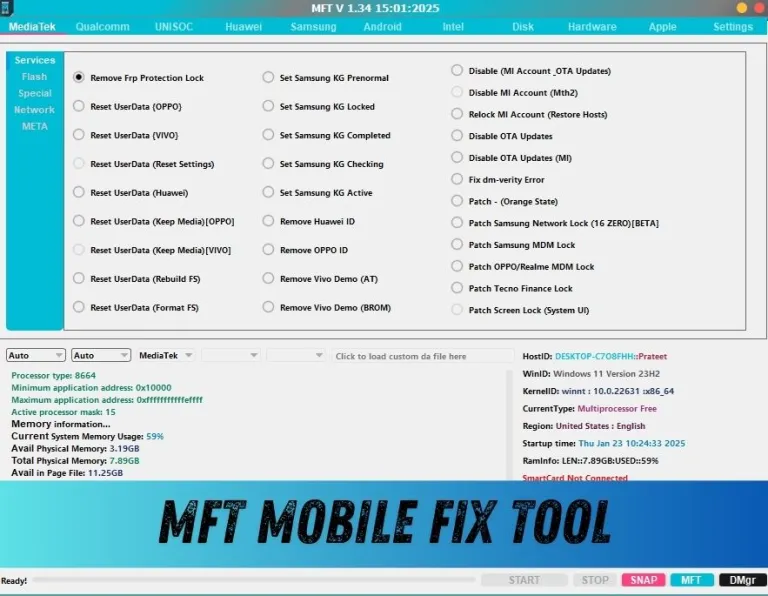
When it comes to flashing Android firmware, unlocking devices, repairing IMEI, or bypassing FRP locks, having the MFT Mobile Fix Tool at your disposal is crucial. A reliable flash tool ensures seamless updates, efficient repairs, and safe customizations. In this comprehensive guide, we explore the top flash tools for Android devices, their features, benefits, and how they stand out in the world of mobile repairing and flashing.
Pass 1111
What Is a Flash Tool and Why Do You Need It?
A flash tool is specialized software that allows users to install or update firmware on Android devices. Whether you want to fix boot loops, unbrick devices, downgrade firmware, or customize ROMs, a flash tool acts as the bridge between your PC and your smartphone.
Key Reasons to Use Flash Tools
-
Unbricking Devices: Restore devices stuck in boot loops or soft-bricked.
-
Firmware Updates: Install the latest stock firmware for stability and performance.
-
Custom ROMs: Flash custom firmware for added features.
-
FRP Bypass: Remove Google Factory Reset Protection locks.
-
IMEI Repair: Fix corrupted or lost IMEI issues.
-
Bootloader Unlocking: Enable modifications and rooting.
MFT Mobile Fix Tools for Android Devices in 2025
Let’s dive into the most powerful flash tools available today, widely used by professionals and enthusiasts for Android firmware flashing.
1. SP Flash Tool (Smart Phone Flash Tool)
The SP Flash Tool is one of the most popular utilities for flashing MediaTek (MTK) devices. Known for its reliability, it supports a wide range of features beyond basic firmware flashing.
Key Features:
-
Supports scatter-loading files for MTK devices.
-
Unbrick dead phones and resolve boot loop issues.
-
Flash custom recovery images like TWRP or CWM.
-
Memory testing for device health checks.
-
Compatible with Windows and Linux.
Best For: MediaTek-based smartphones and tablets.
2. Odin Flash Tool
Odin is the official flash tool for Samsung devices, widely used by professionals and Samsung enthusiasts alike.
Key Features:
-
Flash stock firmware, custom ROMs, and recovery images.
-
Root Samsung devices with ease.
-
Install bootloaders, modems, and kernels.
-
Works seamlessly with Samsung Kies and Smart Switch.
-
Easy-to-use interface for beginners.
Best For: All Samsung Galaxy devices.
3. Mi Flash Tool
Designed specifically for Xiaomi and Redmi devices, the Mi Flash Tool makes flashing MIUI ROMs efficient and user-friendly.
Key Features:
-
Supports both Fastboot and EDL (Emergency Download) modes.
-
Simple user interface with one-click flashing.
-
Includes inbuilt drivers for easy installation.
-
Auto-detect feature ensures compatibility.
-
Supports bootloader unlocking for Xiaomi devices.
Best For: Xiaomi, Redmi, and POCO smartphones.
4. QPST Flash Tool (Qualcomm Product Support Tool)
For Qualcomm chipset devices, QPST Flash Tool is a professional-grade software widely used for firmware installation and repair.
Key Features:
-
Flash stock firmware on Qualcomm-based devices.
-
Backup and restore QCN (Qualcomm calibration network).
-
Repair IMEI issues efficiently.
-
Easy-to-use interface with advanced features.
-
Compatible with multiple Qualcomm smartphones.
Best For: Qualcomm-powered smartphones and tablets.
5. LG Flash Tool
The LG Flash Tool is designed to help users flash KDZ and TOT firmware files on LG smartphones.
Key Features:
-
Flash stock firmware files with ease.
-
Fix boot loop and bricked LG devices.
-
Automatic detection of connected LG phones.
-
Supports multiple firmware formats (KDZ/TOT).
-
Stable and reliable tool for LG users.
Best For: LG Android smartphones.
6. Huawei Flash Tool (Huawei Multi-Tool)
Huawei devices require specialized flashing software, and the Huawei Multi-Tool delivers robust support for both firmware updates and bootloader management.
Key Features:
-
Flash official Huawei firmware packages.
-
Unlock and relock bootloaders.
-
Install custom recovery and root Huawei devices.
-
Supports FRP bypass for locked devices.
-
Advanced features for Huawei professionals.
Best For: Huawei and Honor smartphones.
7. Infinity Chinese Miracle (CM2) Flash Tool
The Infinity CM2 Flash Tool is considered a professional multi-brand flash tool. Widely used by mobile repair shops, it supports a large variety of chipsets and devices.
Key Features:
-
Flash firmware on MTK, Qualcomm, and SPD devices.
-
Repair IMEI and security issues.
-
Remove FRP and screen locks.
-
Perform advanced diagnostics and repairs.
-
Regular updates to support new models.
Best For: Multi-brand device servicing and advanced repairs.
8. UFi Box and UMT Tool
For advanced users and professionals, UFi Box and UMT (Ultimate Multi Tool) provide high-level flashing and repairing capabilities.
Key Features:
-
Support for a wide range of chipsets and brands.
-
Full IMEI repair and security fixing.
-
Advanced FRP bypass methods.
-
Rooting and bootloader unlocking features.
-
Regular updates with new device support.
Best For: Professional mobile repair technicians.
How to Choose the MFT Mobile Fix Tool for Your Device
Choosing the right flash tool depends on your smartphone’s chipset and brand. For example:
-
MediaTek devices → SP Flash Tool.
-
Samsung devices → Odin.
-
Xiaomi devices → Mi Flash Tool.
-
Qualcomm devices → QPST Flash Tool.
-
Multi-brand repair shops → CM2, UMT, or UFi Box.
Always ensure you download flash tools from official or trusted sources to avoid malware or corrupted files.
Precautions Before Using Flash Tools
While flashing can be rewarding, improper use may brick your device permanently. Always follow these precautions:
-
Backup data before flashing.
-
Ensure your device is charged at least 70%.
-
Use the correct firmware version for your device.
-
Install required USB drivers for smooth connectivity.
-
Follow flashing guides step-by-step.
Final Thoughts
Having the MFT Mobile Fix Tool at your fingertips makes a significant difference in maintaining and repairing Android devices. From SP Flash Tool for MediaTek devices to Odin for Samsung and QPST for Qualcomm, each tool is uniquely designed for specific brands and chipsets. For professionals handling multiple brands, advanced tools like Infinity CM2, UFi Box, and UMT are indispensable.
By selecting the right tool and following best practices, you can unlock the full potential of your Android device, whether it’s for personal customization or professional-level repairs.