
0
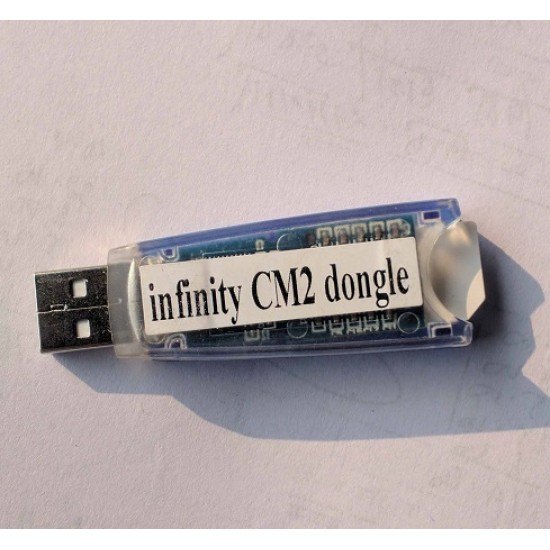
CM2 Dongle Rent New Version 1 Hour
250.00৳
Infinity CM2 Dongle Modules
Infinity CM2 Dongle works with different modules, each designed for specific chipset families:
-
CM2MT2 Module – Handles MediaTek smartphones.
-
CM2SPD Module – Specially for Spreadtrum devices.
-
CM2QLM Module – Designed for Qualcomm devices.
-
CM2SCR Module – Used for screen locks and security repairs.
-
CM2Nokia Module – For flashing and repairing Nokia feature phones.
By combining these modules, users get an unmatched servicing toolkit that can handle almost any mobile repair task.
In stock
Description
Infinity CM2 Dongle – The Ultimate Guide for Mobile Technicians
The Infinity CM2 Dongle has become one of the most powerful and reliable tools for professional mobile phone technicians worldwide. Known for its ability to perform flashing, unlocking, repairing, and servicing a wide range of mobile devices, this dongle is a must-have for anyone serious about smartphone servicing. In this comprehensive guide, we will dive into every detail about the Infinity CM2 Dongle, including its features, supported devices, installation process, benefits, and why it stands out as one of the best tools in the industry.
What is Infinity CM2 Dongle?
The Infinity CM2 (Chinese Miracle 2) Dongle is a professional-grade hardware and software solution designed to manage and repair mobile phones from multiple brands. It is developed by Infinity-Box Team, a highly respected name in the GSM repair industry. With this dongle, technicians gain access to a wide variety of features, making complex phone servicing tasks easier and more efficient.
It supports functions like:
-
Flashing firmware to restore or update phones.
-
Unlocking networks and FRP (Factory Reset Protection).
-
Repairing IMEI and security-related issues.
-
Reading and writing firmware backups.
-
Full diagnostic and testing tools.
Key Features of Infinity CM2 Dongle
The Infinity CM2 Dongle is not just another flashing tool—it is a complete solution for mobile repair. Some of its key features include:
1. Wide Device Support
It supports thousands of models across popular brands like Nokia, Samsung, Xiaomi, Huawei, Oppo, Vivo, and many MTK and SPD-based devices.
2. Firmware Flashing
The dongle allows safe flashing of stock firmware to restore bricked devices or upgrade to the latest version.
3. FRP Unlock & Network Unlock
Technicians can easily bypass Google Account verification (FRP) and remove SIM/network locks, which makes the phone usable on any carrier.
4. IMEI Repair
IMEI corruption is a common issue during repairs, and Infinity CM2 provides a reliable solution for IMEI repair and restoration.
5. User-Friendly Interface
The software is designed with an easy-to-use graphical interface, making it accessible even for beginners in mobile repair.
6. Regular Updates
Infinity-Box Team consistently releases new updates and patches, ensuring compatibility with the latest devices and security protocols.
Supported Chipsets and Brands
One of the major strengths of Infinity CM2 Dongle is its wide chipset support. It covers:
-
MTK (MediaTek) based phones.
-
SPD (Spreadtrum/Unisoc) devices.
-
Qualcomm powered smartphones.
-
Nokia Feature Phones.
-
Chinese and Generic Mobile Brands.
This broad compatibility makes it an all-in-one solution for mobile repair centers.
System Requirements for Infinity CM2 Dongle
To run the Infinity CM2 software smoothly, the system must meet certain specifications:
-
Operating System: Windows 7/8/10/11 (32-bit or 64-bit).
-
Processor: Intel Core i3 or higher recommended.
-
RAM: Minimum 4GB (8GB preferred).
-
USB Port: For connecting the dongle and mobile devices.
-
Internet Connection: Required for updates and some services.
How to Install Infinity CM2 Dongle Software
The installation process is straightforward:
-
Insert the dongle into the USB port of your PC.
-
Download drivers from the official Infinity-Box website.
-
Install Infinity CM2 setup files for the required modules.
-
Run the software and allow it to detect the dongle.
-
Start using the tool for flashing, unlocking, or repairs.
Advantages of Infinity CM2 Dongle
Using the Infinity CM2 Dongle provides several advantages:
-
Time-saving tool for professionals who handle multiple devices daily.
-
One-time investment with lifetime usage.
-
No complicated activation process; simple plug-and-play.
-
Large user community with forums and guides for troubleshooting.
-
Highly stable and safe operations, reducing the risk of device damage.
Why Choose Infinity CM2 Over Other Tools?
While there are several tools available in the GSM repair industry, Infinity CM2 stands out because:
-
It supports a wider range of devices compared to competitors.
-
Offers frequent updates, ensuring relevance with new models.
-
Provides reliable IMEI and FRP repair solutions.
-
The software stability and performance are unmatched.
Common Problems Solved by Infinity CM2 Dongle
Technicians around the globe rely on this dongle for solving:
-
Dead or bricked phones due to faulty flashing.
-
Forgotten FRP lock or screen lock.
-
Corrupted IMEI or baseband issues.
-
Network unlocking for different carriers.
-
Software bugs or unstable performance.
Infinity CM2 Dongle Price and Availability
The Infinity CM2 Dongle is available through authorized resellers and trusted online marketplaces. The price usually ranges between $60 to $100, depending on the reseller and region. Considering its features, it offers excellent value for money for mobile service centers.
Tips for Using Infinity CM2 Dongle Efficiently
To maximize performance and avoid issues:
-
Always use original firmware files from reliable sources.
-
Keep your dongle updated with the latest software versions.
-
Ensure your PC drivers are correctly installed before flashing.
-
Regularly backup important data before servicing a device.
-
Follow official Infinity-Box forums for tutorials and updates.
Reviews
There are no reviews yet.