
0
TFT Unlock Tool 2024 – 6.1.1.1 (Latest Version)
TFT Unlock Tool 2024 – 6.1.1.1 (Latest Version)
Unlocking mobile phones can be both an art and a science, and one of the most talked-about tools in the scene today is the TFT Unlock Tool. Whether you’re a seasoned mobile technician or someone just diving into the world of phone repair, this tool can be a serious game-changer. Let’s break it all down and see what makes this utility so popular.
What is the TFT Unlock Tool?
The TFT Unlock Tool is a professional-grade software application designed to bypass a wide range of smartphone locks. We’re talking about FRP (Factory Reset Protection), Mi Account locks, bootloader locks, and even network carrier restrictions.
This tool is especially popular among technicians because it simplifies what would otherwise be a very complicated and technical process. With just a few clicks, you can breathe new life into a locked or “bricked” device.
Why Mobile Locks Exist and What They Do
Let’s take a quick detour—why do phones even have these locks?
FRP (Factory Reset Protection)
It’s a security feature by Google to stop unauthorized factory resets. After a reset, the phone asks for the last synced Google account. Great for security, but a nightmare if you forget the credentials.
Mi Account Locks
These are Xiaomi’s version of FRP. Without logging into the previous Mi account, your phone is essentially a brick.
Bootloader Locks
These locks prevent unauthorized firmware flashing. Good for stability, bad for modders.
Network Locks
Phones from certain carriers come locked. Want to use another SIM? Not happening without unlocking.
TFT Unlock Tool handles all of these, often without needing advanced skills.
Overview of TFT Unlock Tool
TFT is not just a single-feature utility. It’s a multi-brand, multi-function powerhouse.
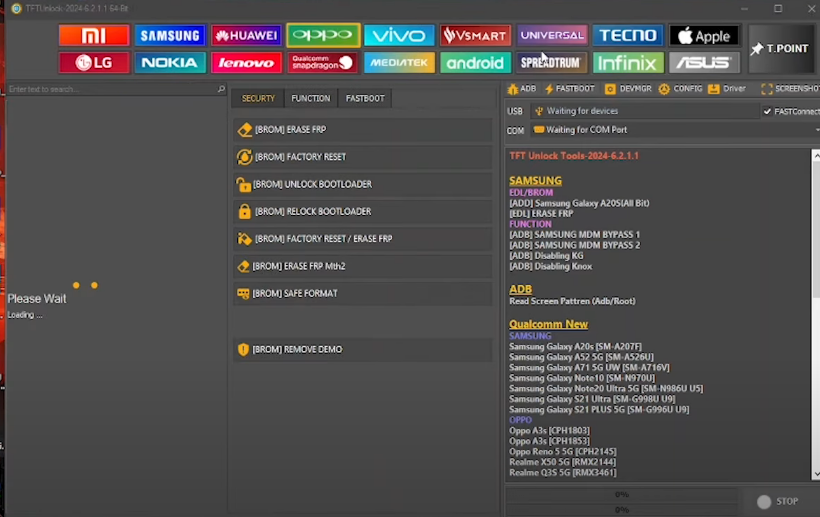
Software Name: TFT_Unlock.zip
Software Size: 554MB
Developer: TFT
Compatibility: Windows
Type: zip
Password: TFT
Download AFH
Supported Brands
-
Xiaomi
-
Samsung
-
Oppo
-
Vivo
-
Huawei
-
Realme
-
Tecno
-
Infinix
-
And many more!
Main Features
-
FRP unlock
-
Mi Account reset
-
Flashing stock firmware
-
Root access
-
IMEI repair (in supported regions)
-
Bootloader unlock
-
Bypass security
Compatibility
The TFT Unlock Tool works best on Windows 10 and Windows 11 systems. It supports both 32-bit and 64-bit operating systems.
Device Compatibility
-
Android 6 to Android 13+
-
Spreadtrum, MTK, Qualcomm chipsets
-
Fastboot and EDL modes supported
Installing the TFT Unlock Tool
Installing TFT is relatively straightforward.
Step-by-Step Guide
-
Download the tool from the official or verified mirror.
-
Extract the ZIP using WinRAR or 7Zip.
-
Disable Antivirus temporarily (some antivirus software flags it falsely).
-
Run as Administrator.
-
Install necessary drivers (ADB, MTK, Qualcomm, etc.)
-
Restart your PC before launching.
TFT Unlock Tool Alternatives
-
UMT Dongle
-
Hydra Tool
-
Octoplus Box
-
MRT Tool
These tools offer similar functions, but TFT stands out for its simplicity and no-dongle requirement.
Best Practices When Using TFT Tool
-
Backup all data before unlocking.
-
Charge the phone above 50%.
-
Use original USB cables.
-
Update drivers regularly.
-
Stay up to date with the latest tool version.